Triaging an SSH brute force alert
A brute force tries one password after another until one works. I ran one over SSH against a server in my own lab, on an isolated Docker network, then handled the logs as I would a real alert.
Alert
The server’s authentication log shows 205 failed SSH logins from one address in under three minutes, then one successful login from that same address. MITRE ATT&CK, the reference catalogue of attacker techniques, lists this as Password Guessing (T1110.001). A success right after so many failures from the same address is a strong sign that a guess was right. The account has to be treated as compromised until checked.
Evidence
Each line of the log gives the time, the result, the account and the source address.
2026-10-11T07:33:51.573987+00:00 7fb20db82292 sshd[699]: Failed password for deploy from 172.30.0.20 port 47404 ssh2
2026-10-11T07:34:05.368456+00:00 7fb20db82292 sshd[705]: Failed password for invalid user admin from 172.30.0.1 port 39600 ssh2
2026-10-11T07:34:07.916221+00:00 7fb20db82292 sshd[707]: Failed password for invalid user test from 172.30.0.1 port 39410 ssh2
2026-10-11T07:34:16.149605+00:00 7fb20db82292 sshd[715]: Failed password for deploy from 172.30.0.1 port 39436 ssh2
2026-10-11T07:36:39.462333+00:00 7fb20db82292 sshd[1133]: Accepted password for deploy from 172.30.0.1 port 44378 ssh2
invalid user means the account does not exist on the host. Accepted password is the login that worked.
This command keeps the failed lines, extracts the source address and counts how often each one appears.
grep "Failed password" auth.log \
  | awk '{print $(NF-3)}' \
  | sort | uniq -c | sort -rn | head -5
205 172.30.0.1
3 172.30.0.20| Indicator | Type | Events | Note |
|---|---|---|---|
172.30.0.1 |
Source address | 206 | 205 failures, then the successful login |
172.30.0.20 |
Source address | 3 | Plays a user who mistypes the password |
deploy |
Account | 207 | Only account that logged in |
admin, test |
Account | 2 | Not present on the host |
The address tried two accounts that do not exist, then spent all its remaining attempts on deploy. After a slow start, the failures come four or five in the same second, roughly every three to four seconds. Nobody types at that rate, so the guessing was automated.
Detection
A SIEM, the platform that collects logs and raises alerts, needs a rule to catch this on its own. I wrote it in Sigma, a rule format that converts to the query language of most SIEMs. The rule has two parts. The first matches a single failed password in the sshd log. The second counts those failures per source address and fires at 20 within 5 minutes.
title: SSH failed password
name: ssh_failed_password
id: 6f1c4a2e-3b7d-4e58-9a10-2c5d8e7f4b31
status: experimental
logsource:
    product: linux
    service: sshd
detection:
    keywords:
        - 'Failed password'
    condition: keywords
level: low
---
title: SSH password guessing from one source
id: 9d3e7b52-1a64-4c8f-b2e9-5f0a6c3d8e17
status: experimental
correlation:
    type: event_count
    rules:
        - ssh_failed_password
    group-by:
        - src_ip
    timespan: 5m
    condition:
        gte: 20
tags:
    - attack.credential-access
    - attack.t1110.001
level: medium
A user who mistypes a password fails a few times, far from 20. The rule passes sigma check, the Sigma validator.
To test it, I loaded the log into Splunk and ran the rule converted to Splunk’s search language. The sshd log line does not label the address, so a rex line extracts it as src_ip.
Splunk counts in fixed five-minute windows and returns only 172.30.0.1, with 64 failures between 07:30 and 07:35 and 141 between 07:35 and 07:40.
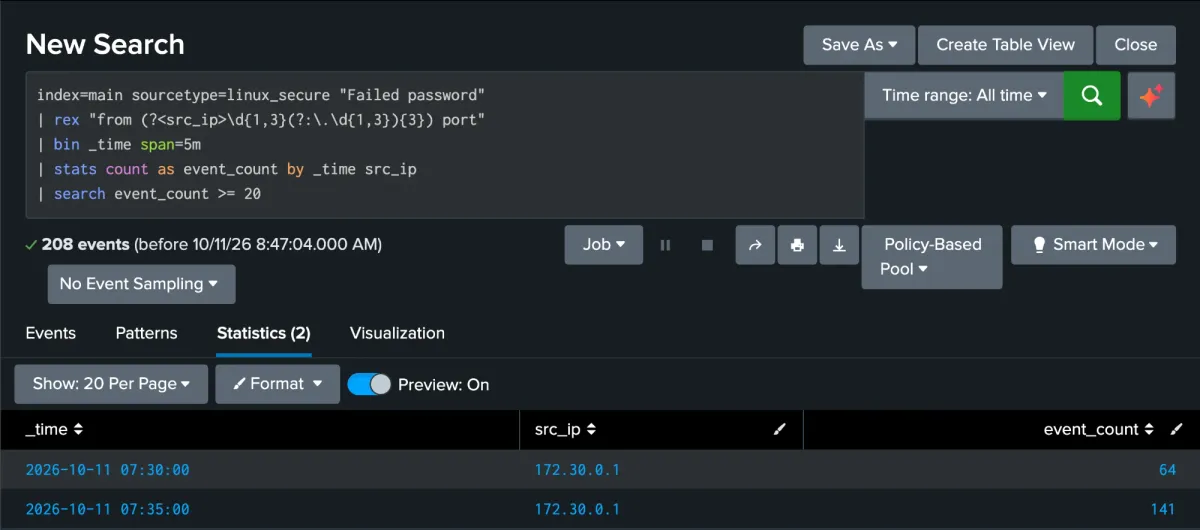
Fixed windows do not show the exact moment the threshold is crossed. A second search over a sliding five-minute window, with streamstats, puts it at 07:34:24, 19 seconds into the burst. The three failures from 172.30.0.20, the user who mistyped, stay under it.
To see whether the guessing worked, the next search is Accepted password for the same address. It returns one event, the login to deploy at 07:36:39.
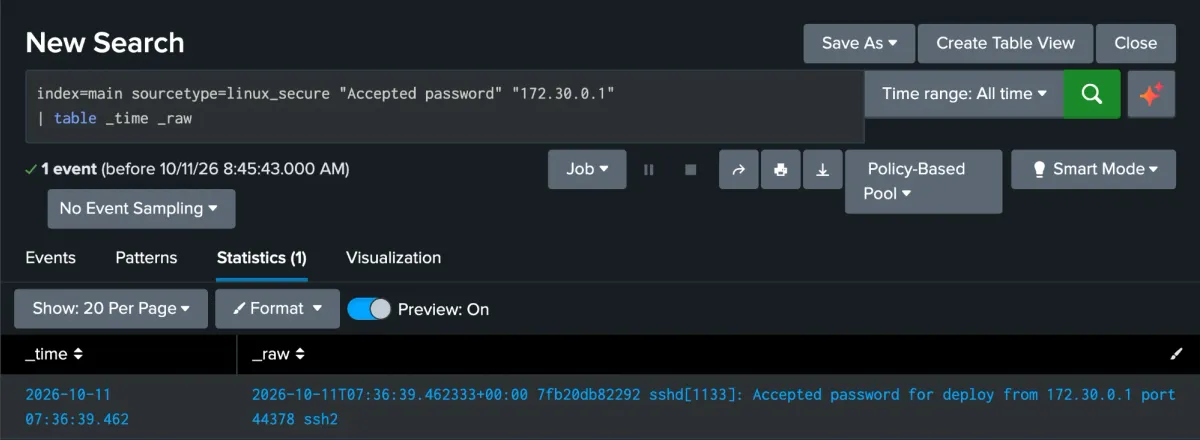
The same log shows what came next. The session opened at 07:36:39.464 and the client closed it 54 milliseconds later.
Response
- Block the source address at the firewall, after checking it is not a gateway shared by other clients.
- Lock the
deployaccount and reset its password. - Review the session for commands run, files created and outbound connections.
- Allow SSH key authentication only, with
PasswordAuthentication noandKbdInteractiveAuthentication no.
With a key, the private half stays on the user’s machine and is far too long to guess. Once passwords are turned off, the server rejects every password attempt, so password guessing like this no longer works.